How-to Video
This short video will show you how simple it is to use an Enterpad to trigger AutoHotkey scripts. For example, if you would like to set the Enterpad key number eight to launch Google, follow these three easy steps:
Overview
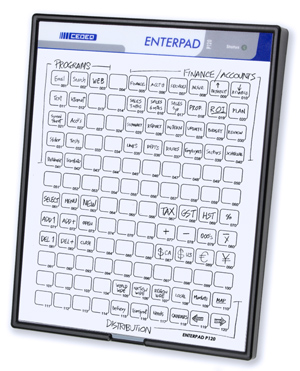
Add greater efficiency to your workflow with instant execution of your AutoHotkey scripts. Time is money and the combination of the Enterpad and AutoHotkey means cutting down on tedious mouse movements and keystrokes while automating processes into one-touch efficiency. Each of the 120 Enterpad trouble-free hotkeys is available to run a custom script. This user-friendly interface means:
- No hotkeys to remember
- No hotkeys to guess
- No hotkey conflicts
With myriad uses (accounting, trading, project management, medicine, and many more), the AHK Enterpad brings new levels of efficiency and practicality to every application. It can also help reduce repetitive stress injuries by reducing keyboard and mouse click movements.
Installation is a Snap!
1. Plug in the AHK Enterpad
2. Get our streamlined AutoHotkey script template
3. Input some commands (e.g. "run www.google.com")
You’re ready to go!
Reliable — Only the Enterpad has features that work seamlessly with AutoHotkey. The Enterpad has been used by tens of thousands of users for a wide range of applications and environments. It has stood the test of time.
Menus and mouse clicks rob valuable time and energy. AutoHotkey is one of the best keyboard and mouse automation tools around. The AHK Enterpad makes the most of your existing AutoHotkey know-how to achieve the ultimate interface for Windows automation. Automate character and command sequences using this effective combination. Data entry has never been easier for the end user when the Enterpad is combined with this unique utility.
Integration Resources
-
AHK main script template
Instead of having to create an AutoHotkey file from scratch to put your scripts and Enterpad code into, we created a template for you. You can add your scripts directly to the template. Our approach was to keep the template simple to help you understand how everything works. You can always add more sophisticated code to it should the need arise.
The template is a set of three files that are to be placed in the same folder:
- Enterpad.ahk
- EPReport.ahk
- Enterpad.dll (use with 64-bit AutoHotkey) OR Enterpad.dll (use with 32-bit AutoHotkey)
The file Enterpad.ahk is where you input your scripts. By running this AutoHotkey file, you will be able to trigger your scripts with the Enterpad. The files EPReport.ahk and Enterpad.dll manage the Enterpad. It is possible to modify commented sections of the 'EPReport.ahk' file should you need to add session notification code and/or add custom cleanup code on script exit.We use AutoHotkey (Unicode installation) to develop and maintain our scripts. You can download the latest version from the AutoHotkey official website: https://autohotkey.com
-
Overlay templates
Creating an overlay can be time consuming. Not with the Enterpad. We have templates that you can customize with your favorite drawing software, which will help you create your own overlay in no time:
- Adobe PDF with key numbers (see or download) †
- Adobe PDF without key numbers (see or download)
- Adobe Illustrator CS3 and up (download)
- Adobe Photoshop CS4 and up (download)
- Microsoft Word 2003 and up with key numbers (download) †
- Microsoft Word 2003 and up without key numbers (download)
† To start, we suggest that you use a numbered template. One of the very useful Enterpad/AHK combo features is the ability to add/modify macros on the fly. Instantly knowing the number of the macro you want to edit is a must. -
Useful AHK scripts
Are there any keys on your Enterpad that are still unassigned? Or do you simply want to create a new script from an existing one? We offer a collection of useful scripts that you can start from: Useful Scripts